
Asset Flow
A Designer focused Digital Asset Management app
Client
Personal Project
My Role
UX Researcher and Designer
Duration
4 Weeks
Focus
Case study for researching Digital Asset Management (DAM) softwares
Tools
Figma , Notion , Google Forms
Overview
Asset Flow is a Digital Asset Management application (henceforth called as DAM) that helps designers and product managers streamline design workflows from a single source of truth for design assets.
The Struggle
Every designer has faced it
- dozens of file versions
- duplication and loss of files across folders , emails , and chat threads.
- “Final.psd” becomes “final_final_v2_latest.psd,” and nobody knows which one is approved.
What starts as a creative process ends up in a confusion.
The Idea
While researching how creative teams handle their design assets, I discovered a consistent frustration - existing asset management tools were built for marketers and IT teams, not for designers
Designers needed a system that spoke their language:
- drag-and-drop simplicity
- visual clarity and
- automation that quietly handled naming, versioning, and compression without endless menus or jargon.
The Mission
The Gap inspired me to build a DAM experience that intelligently detects duplicates, versions files automatically, compress assets , and connects directly to design and storage tools helping teams stay focused on creating, not organizing.
Research
Objective
Identify opportunity to optimize and reduce manual workload of designers in managing their digital design files
What are the current pain points designers experience ?
How much time to they spend in finding the files ?
Establish UX benchmark
Method 1 : Survey
Why did I choose this methodology ?
Prioritize pain points : Survey provides a comprehensive way of identifying and prioritizing of pain points
Validate using statistics : Gather sufficient data for establishing a benchmark & validate the design against it
Timely insights : This method is efficient way of gathering quantitative data in short time-frame
Read more about the Survey
Method 2 : Social Listening
Why did I choose this methodology ?
Designers share their unfiltered experiences on social platforms - frustrations with designing tools , lost work etc
Social listening allowed me to capture these pain points which was essential for a remote friendly research setup
Read more about Social Listening
Insights
Survey Results
Result 1 : Time Spent in searching design files
Average time spend by a designer ~5 minutes/per file
If a designer used 5 files a day and it takes ~5 minutes per file → 25 min/day
At ₹120/hr for 8 hours a month - Cost incurred for 1 designer is ₹960/month. A team of 10 designers would incur - ₹10,000 a month or 1,20,000 a year
These numbers may look small, but even a few minutes of lost time each day scale into hours of wasted effort per designer per month -a hidden cost companies rarely calculate
Result 2 : Challenges faced by designers
The most common frustrations are around :
- Version control
- Duplication
- Poor naming conventions
Secondary but notable issues are :
- Lack of sharing options
- Time consuming
- Lack of tagging system
- File size maintenance
Social Listening Results
To go beyond statistics, I analysed public conversations across platforms like Reddit
Common patterns emerged:
Version chaos: Multiple variants of the same file stored across drives and cloud folders.
Duplication: Slightly renamed or modified assets being uploaded multiple times.
Poor naming conventions: No standardized file naming rules, leading to endless confusion during handoffs.
This qualitative input confirmed what the survey revealed - designers were struggling with organization overhead.
Competitor Analysis
Features | Dash DAM | LingoApp DAM | AssetFlow |
|---|---|---|---|
Upload - Batch Upload | ✔ | ✔ | ✔ |
Search | ✔ | ✔ | ✔ |
Retrieve/Download | ✔ | ✔ | ✔ |
Delete | ✔ | ✔ | ✔ |
Recover from deletion | ✔ | ✔ | ✔ |
Compress | ❌ | ❌ | ✔ |
Naming convention | ❌ | ❌ | ✔ |
Versioning | ❌ | ❌ | ✔ |
Duplication management | ❌ | ❌ | ✔ |
Sharing | ✔ | ✔ | ✔ |
Tagging | ✔ | ✔ | ✔ |
User Management | ✔ | ✔ | ✔ |
Final Insights
Survey Insights | Social Listening Insights | Competitor Analysis (LingoApp) Insights | Competitor Analysis (Dash DAM) Insights | Gartners list of Mandatory Features for a software to be considered a DAM |
1) Average time spend by a designer ~5 minutes/per file | 1) Version chaos | -No standard naming convention | -No versioning | 1) Organization of Storage : |
2) Common Frustrations : | 2) Duplication | - no option to compress files | - no option to compress files | 2) Asset Ingestion and Creation : |
3) Secondary Frustrations : | 3) Poor naming conventions | 3) Distribution and Integration : |
Problem Statement
Designers spend a lot of time organizing which they can instead use in creating. A solution is needed that reduces cognitive load by automatically handling :
File Discovery
Versioning
Naming
Duplication
Tagging
File Size
The Process
To handle various tasks, we need to define the task flow that manages design files from the upload stage. To become the single source of truth, the system should run the following rules:
Is the file a duplicate?
Can the file be considered as a new version?
Is the file named according to naming conventions?
These rules will help establish the true authenticity of a file and maintain its validity throughout the system.
How I defined the task flow ?
Read more about the task flow
Visualizing Task Flow
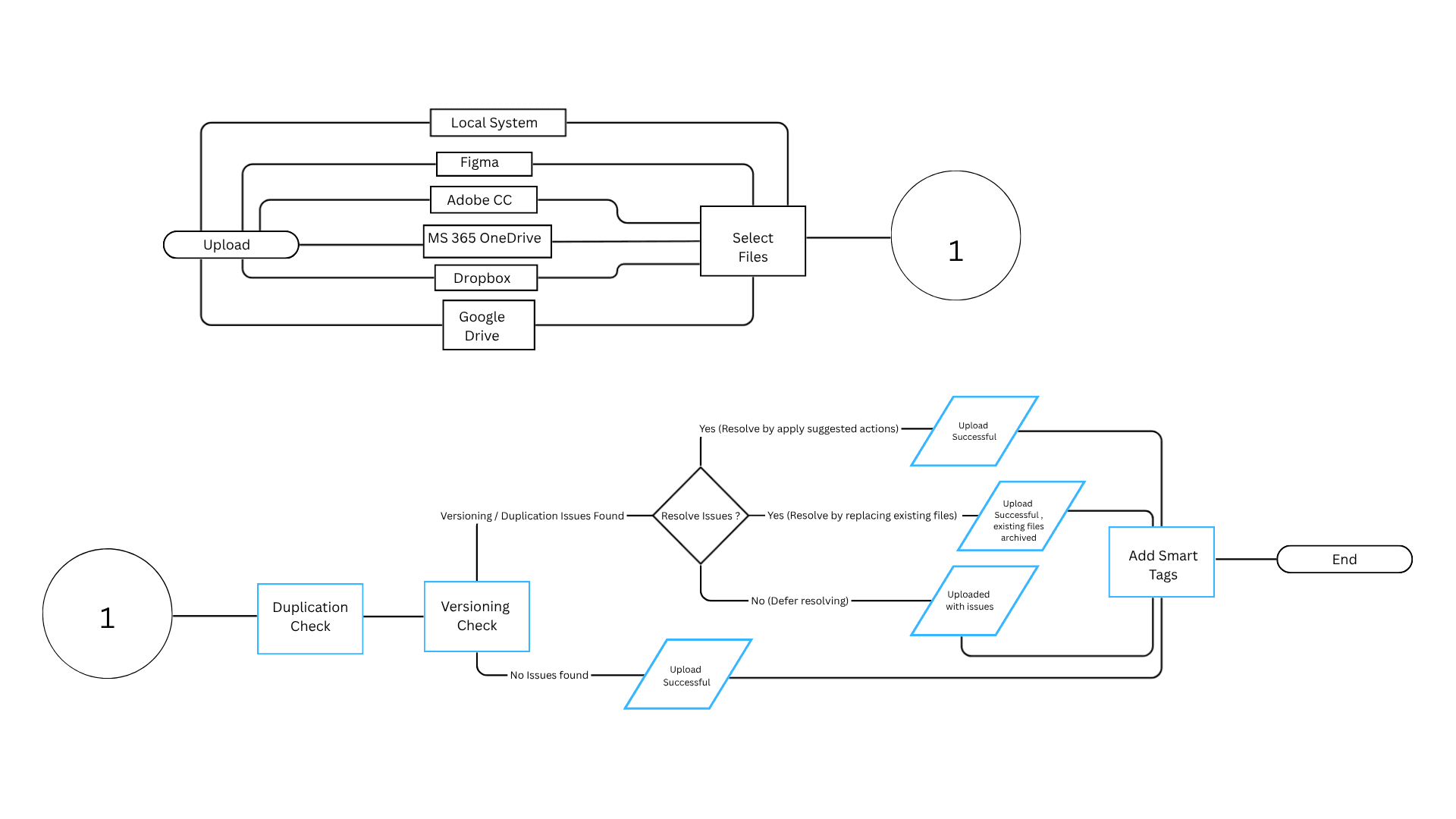
Primary Task : Upload Files
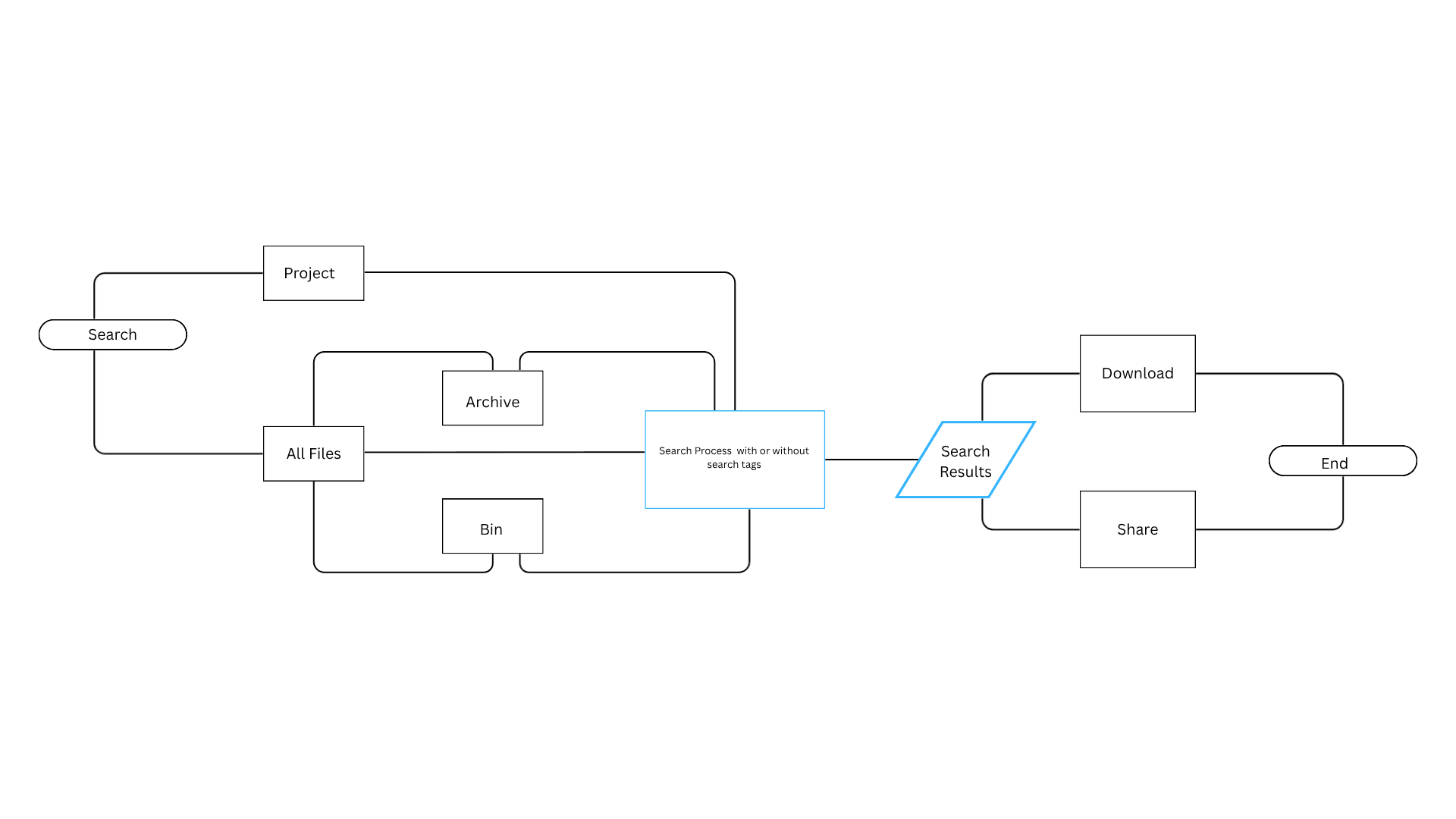
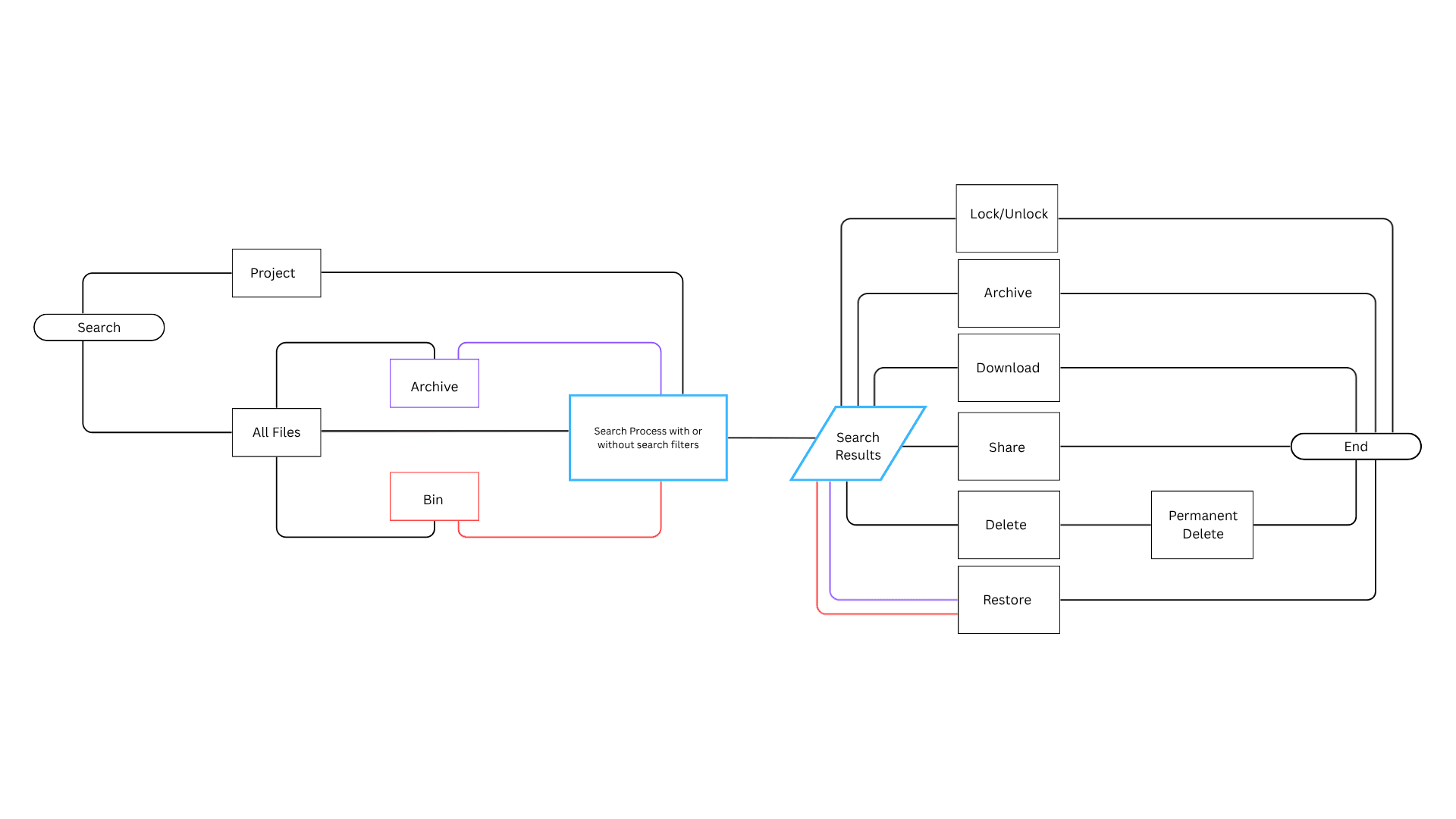
Primary Task : Search Files , Secondary Tasks : Download , Share , Lock , Archive , Delete and Restore
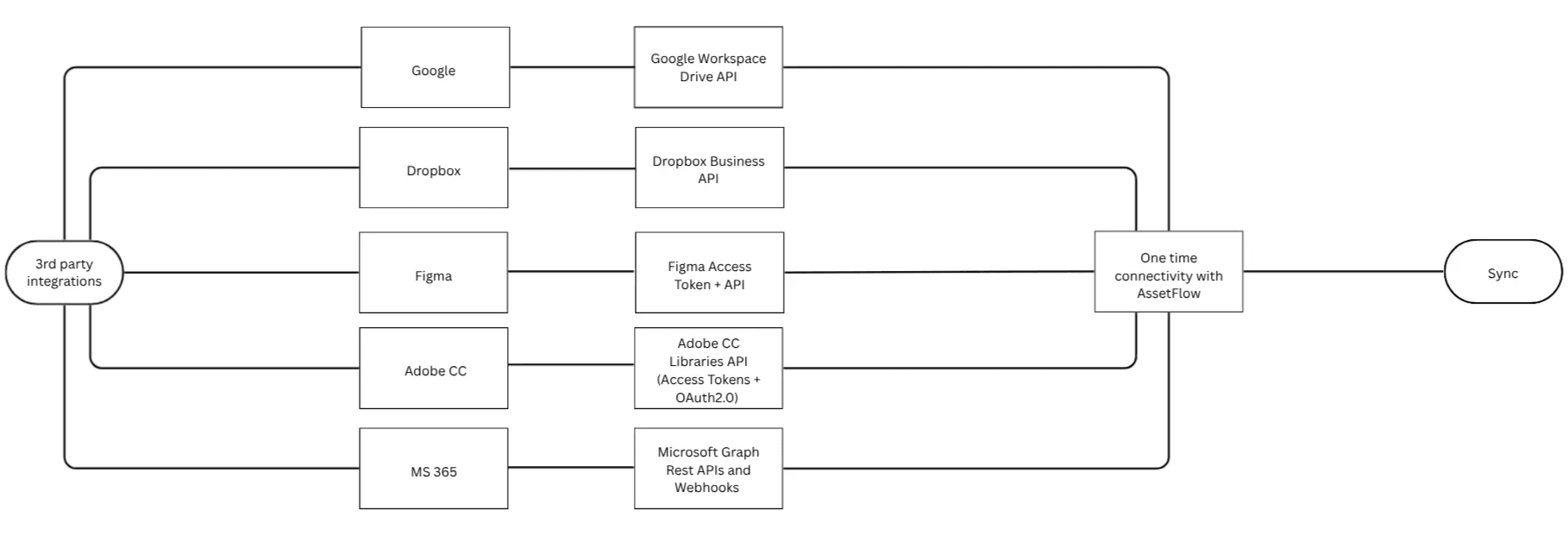
3rd Party Integrations with DAM
Rough sketches and Ideas for the UI
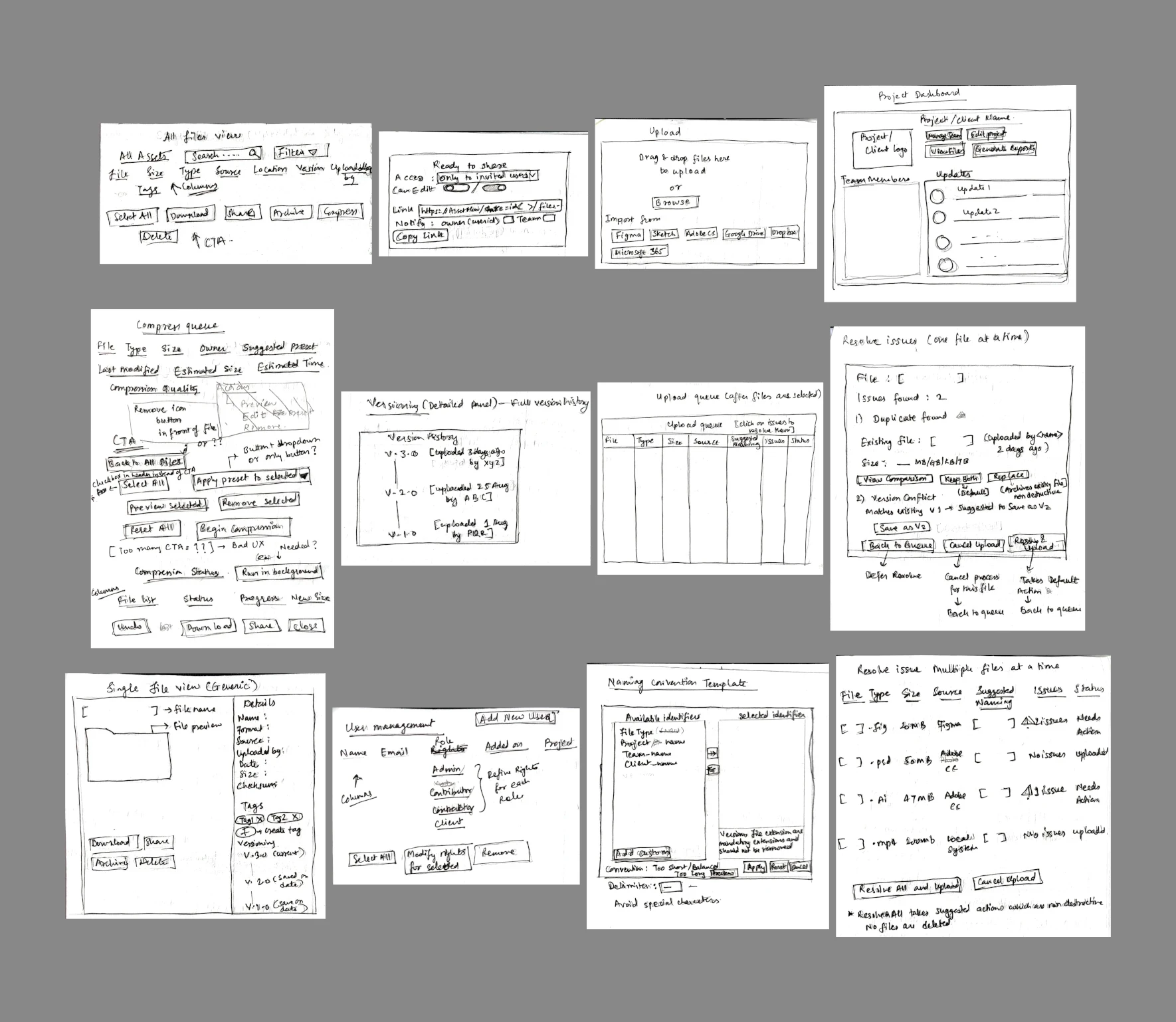
Wireframing
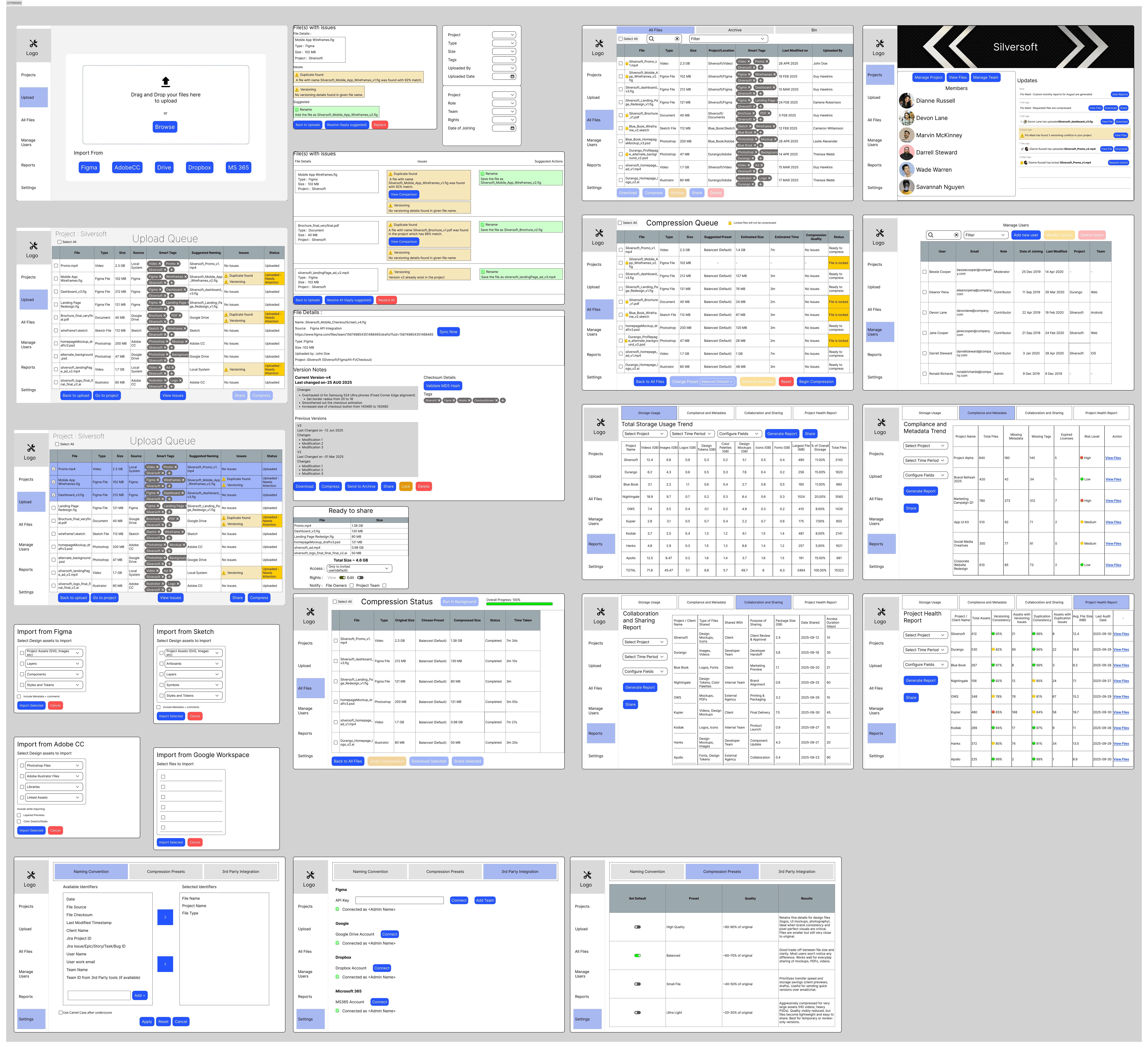
Final Design Mockups
Introducing Asset Flow
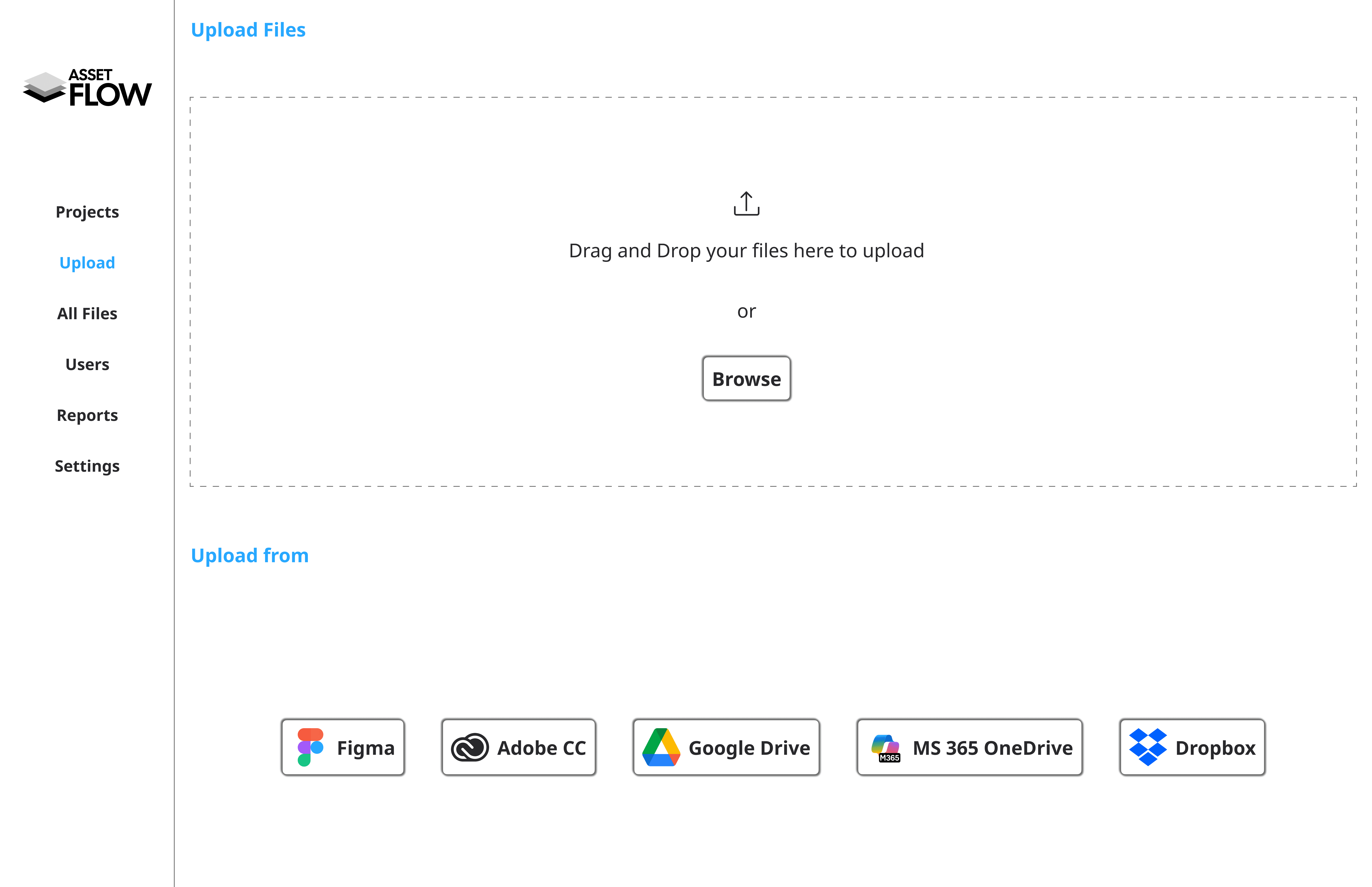
Supports Multiple creative tools
Designer can drag and drop multiple files or browse and upload entire folders, depending on their needs.
But that's just the beginning. AssetFlow lets designers directly connect and synchronize their design assets from Adobe's Creative Cloud , Microsoft 365 , Dropbox , Drive , Figma
Simple & Efficient Asset Management
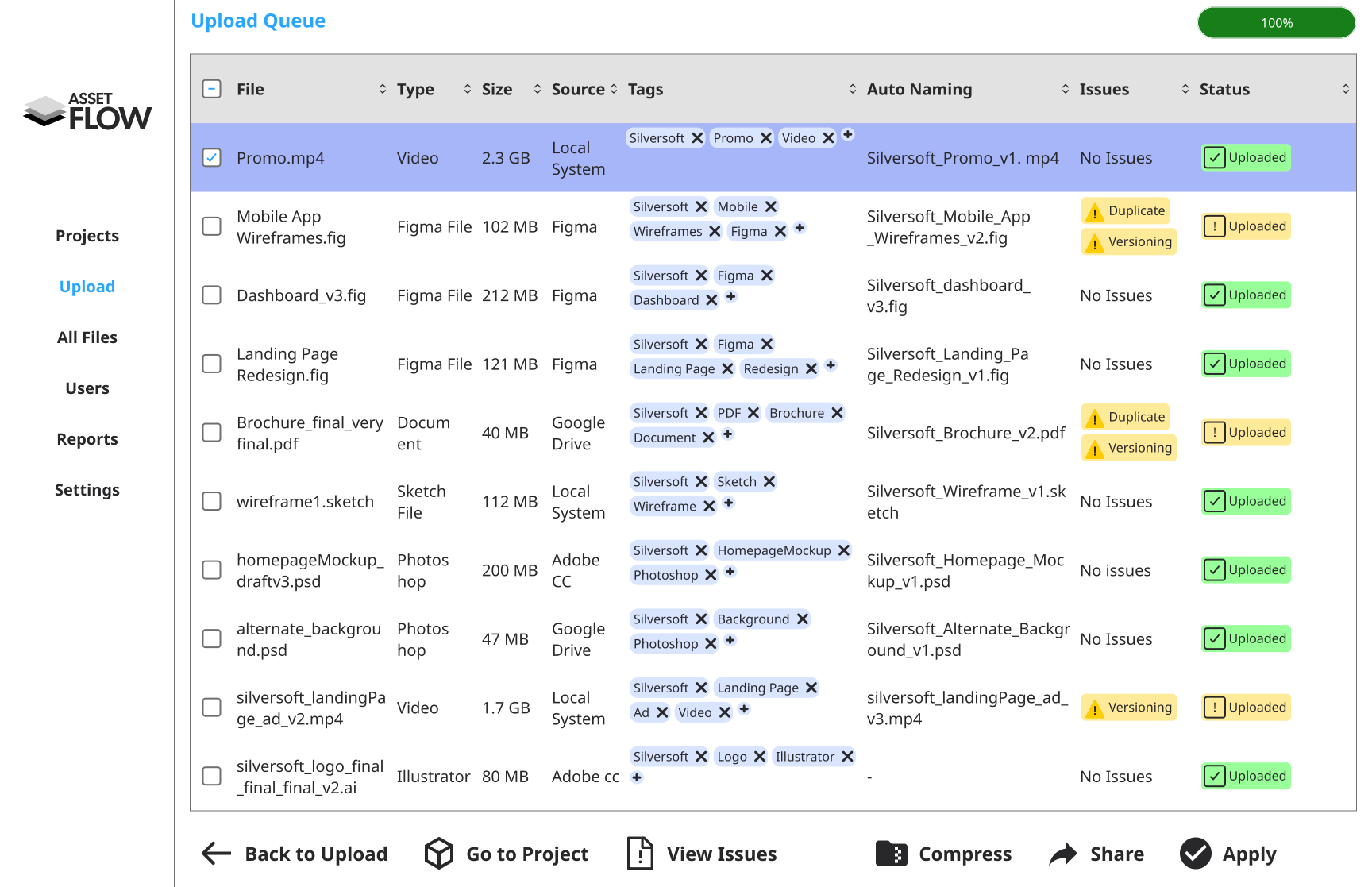
Once the files are uploaded, the system automatically analyses them and runs rigorous checks for duplication, versioning, and naming conventions, then assigns tags.
The system highlights files with issues—such as duplicates or versioning conflicts—and suggests recommended names based on naming convention rules.
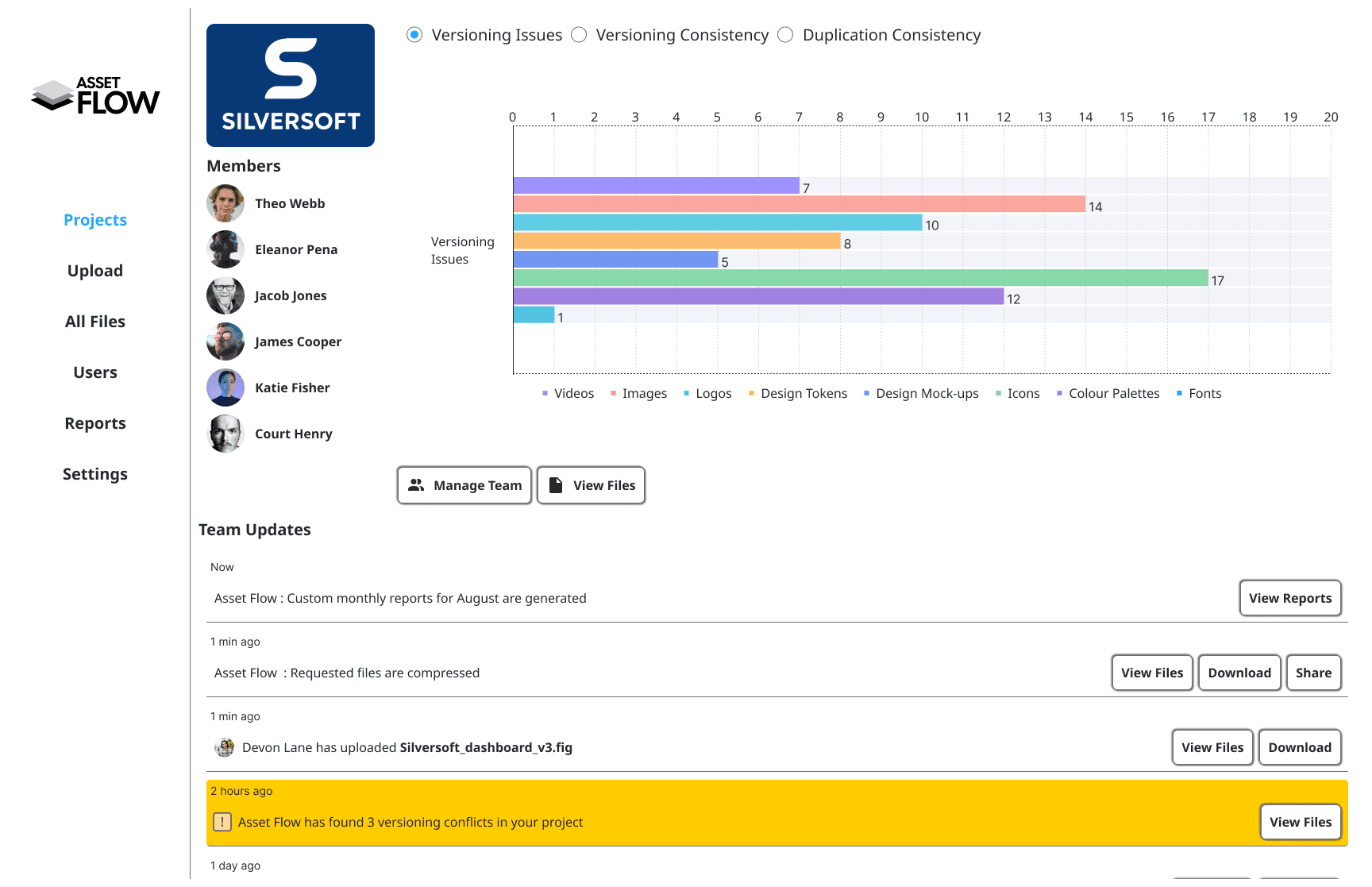
Personalised Dashboard for all Client Projects
AssetFlow’s Real Time Dashboard keeps track of your Client Project activities keeping all designers in your team on the same page
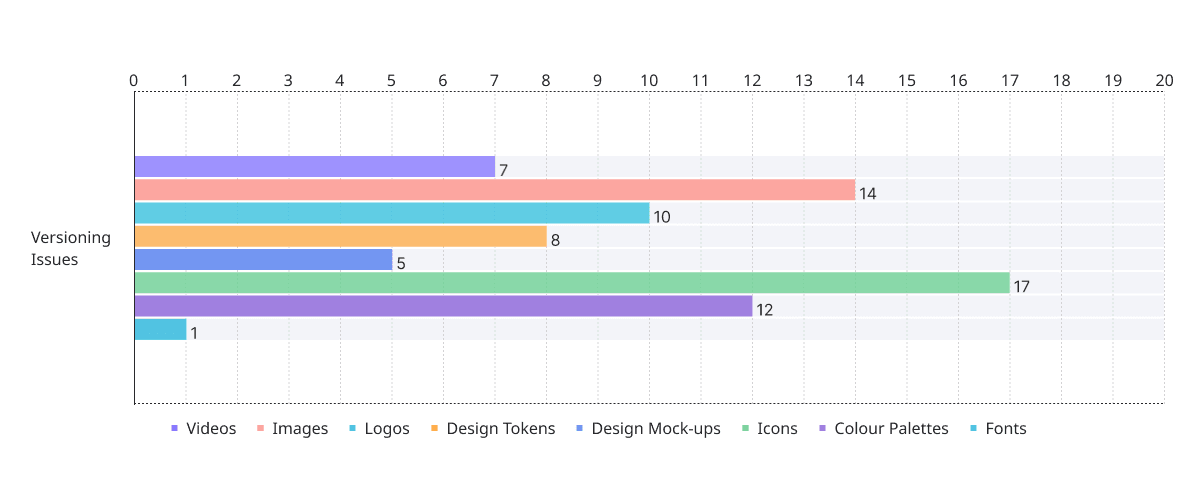
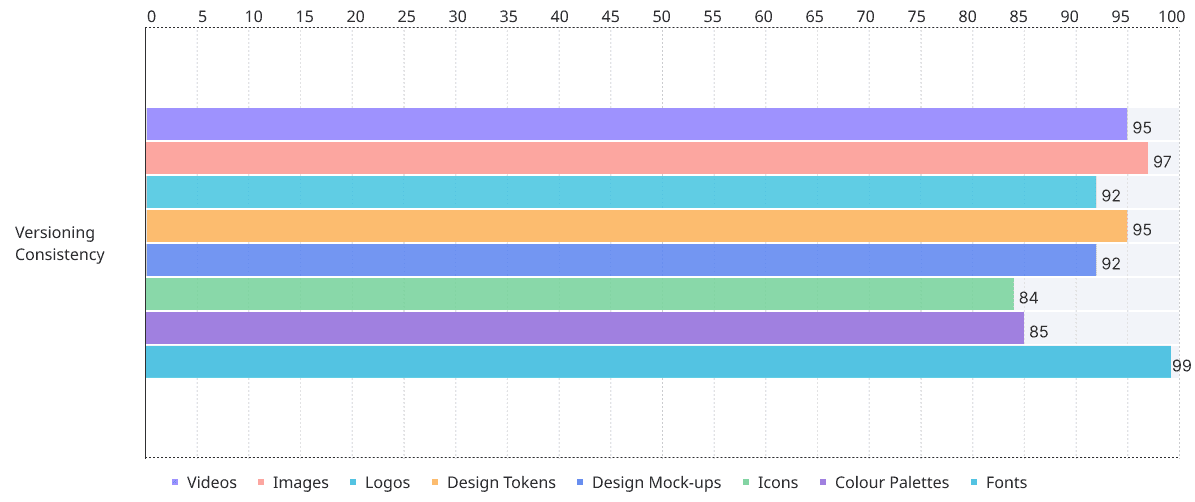
Unlock insights: Customize reports to optimize asset usage
Monitor asset usage and status in real time with fully configurable and customizable reports
Impact
Since this is a conceptual case study the following impact is estimated using the findings of my own research results.
Research Findings | Impact | Context of Impact |
|---|---|---|
Survey : 11 Survey respondents (46%) highlighted problems with duplication of files | Asset Reuse and Duplication Reduction | Easy search and retrieval of assets via: |
Survey : 13 respondents (54%) highlighted problems with multiple versioning of the files | Automating Version management | Simple yet meticulous versioning reduce time in juggling with multiple versions of files , allowing designers for quicker handoffs and designers spend less time organizing and more time creating |
Survey : 10 respondents (42%) highlighted confusion and difficulties with poor naming conventions | Reduction in renaming - Quicker sharing /handoffs , less cognitive load | Configurable Naming convention allows teams to create and follow customised standard naming convention rules unique to their own team or clients - helping efficiently search and retrieval of files , quick sharing for handoffs and reviews by saving manual renaming of files. |
Survey : 4 respondents (17%) spent more than 10 minutes searching for a single design file | Reduction in File Search and Retrieval delay | Enhanced tagging features and custom tagging rules allows user to easily search and retrieve files - enabling more time creating , less time searching. |
Survey : 1 respondent (4%) said file size and constant compression is an issue. | File Size maintenance | In built compression mechanism provides easy to setup compression presets , allowing designers to either select the available presets or simply go with default choice. |
Survey : 5 respondents (21%) highlighted the lack of in-built sharing | In built sharing | In built sharing allows custom access (read, write , edit) to selected recipients (restricted by emails ) and option to limit link access time (set link expiry) |
What I learnt
There are multiple ways to approach one problem. Initially I did not consider outside of traditional UX research methods but I looked into more newer methods like Social Listening which I used to focus on Designer’s problems and turned them into proxy user quotes.
Often times I had to gather quick ideas regarding how cloud storage and other DAMs incorporate certain features in their solutions , for which I took help of A.I. But I noted A.I. often hallucinates and provides mixed results. Its best to triple check your findings.
There are always more features which one can add into their solution to stand out however I realized while doing so my solution was detouring from the problem statement.